# FDM / FFF 3D Printers
General info links on FDM/FFF 3D printing, and specific information on machines in basement.
Fused Deposition Modeling (FDM) is the most common term for this printing technology, but the term was/is copyright. Fused Filament Fabrication (FFF) was coined by the open-source [RepRap](https://en.wikipedia.org/wiki/RepRap) (Wikipedia) community in 2005 to avoid legal issues.
If you're new to FFF printing, this is a decent general overview: [https://all3dp.com/2/3d-printing-for-beginners-all-you-need-to-know-to-get-started/](https://all3dp.com/2/3d-printing-for-beginners-all-you-need-to-know-to-get-started/) (Full article, 3,000 words, broken into small section.)
# Start here for using Ridgewood Commons 3D Printers
##### 3D printing is a pretty straightforward idea, but in practice there are a lot of ways for it to mess up.
Here are some basics for best practices of using 3D printers at RC.
### Current Printers
Current printers are all listed on the front page of this chapter.
# Bambu P1S
## Basics
- Our most reliable FDM/FFF printer.
- Use a microSD card to transfer files to printer.
- Print in PLA only.
- (If you have experience troubleshooting and tuning for bed adhesion and nozzle clogs, use matte, silk, and petg, but ***you will be responsible*** for returning the printer to usable condition in case of any issues)
# Ultimaker S5 general info
## The Basics (from manual)
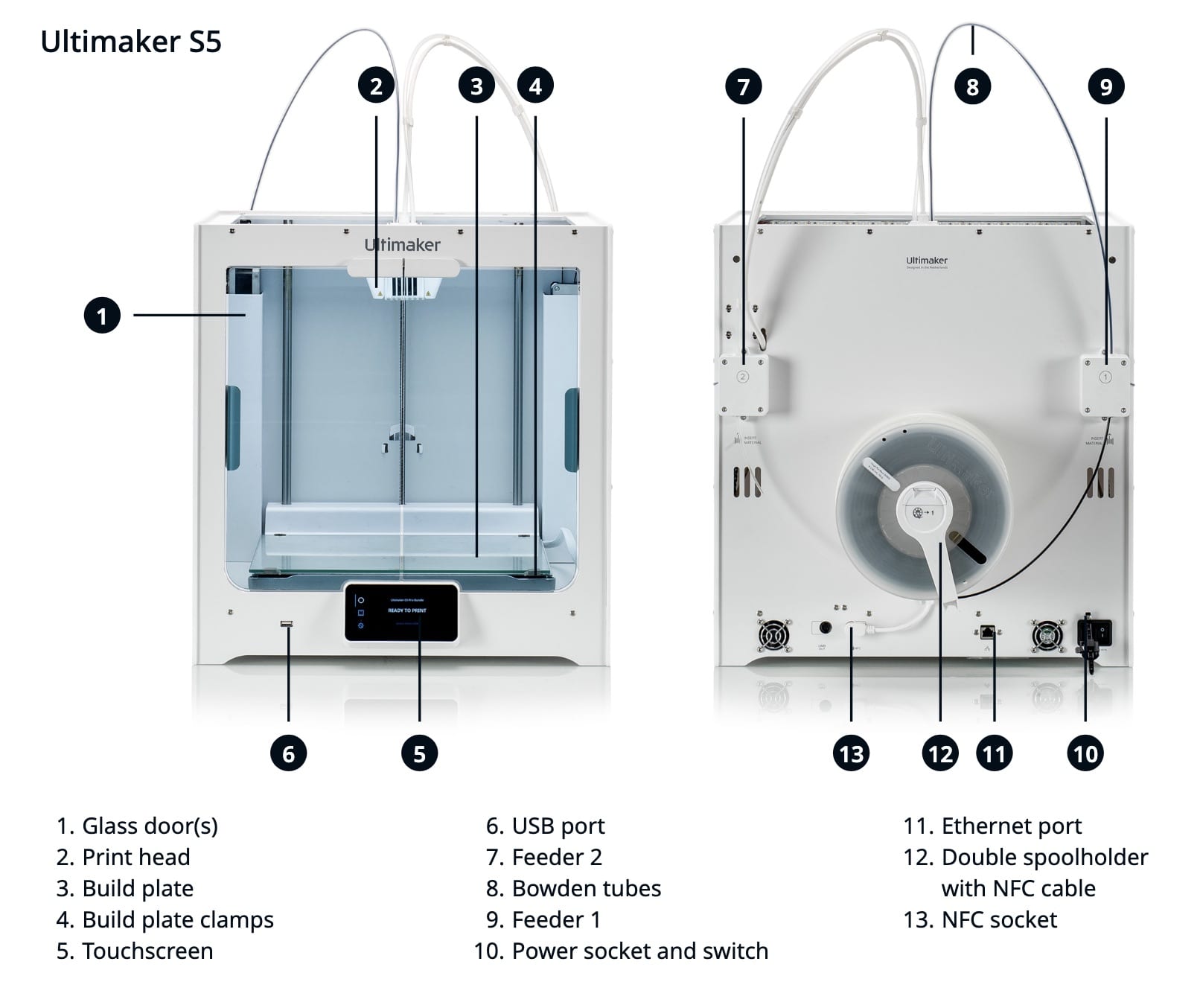
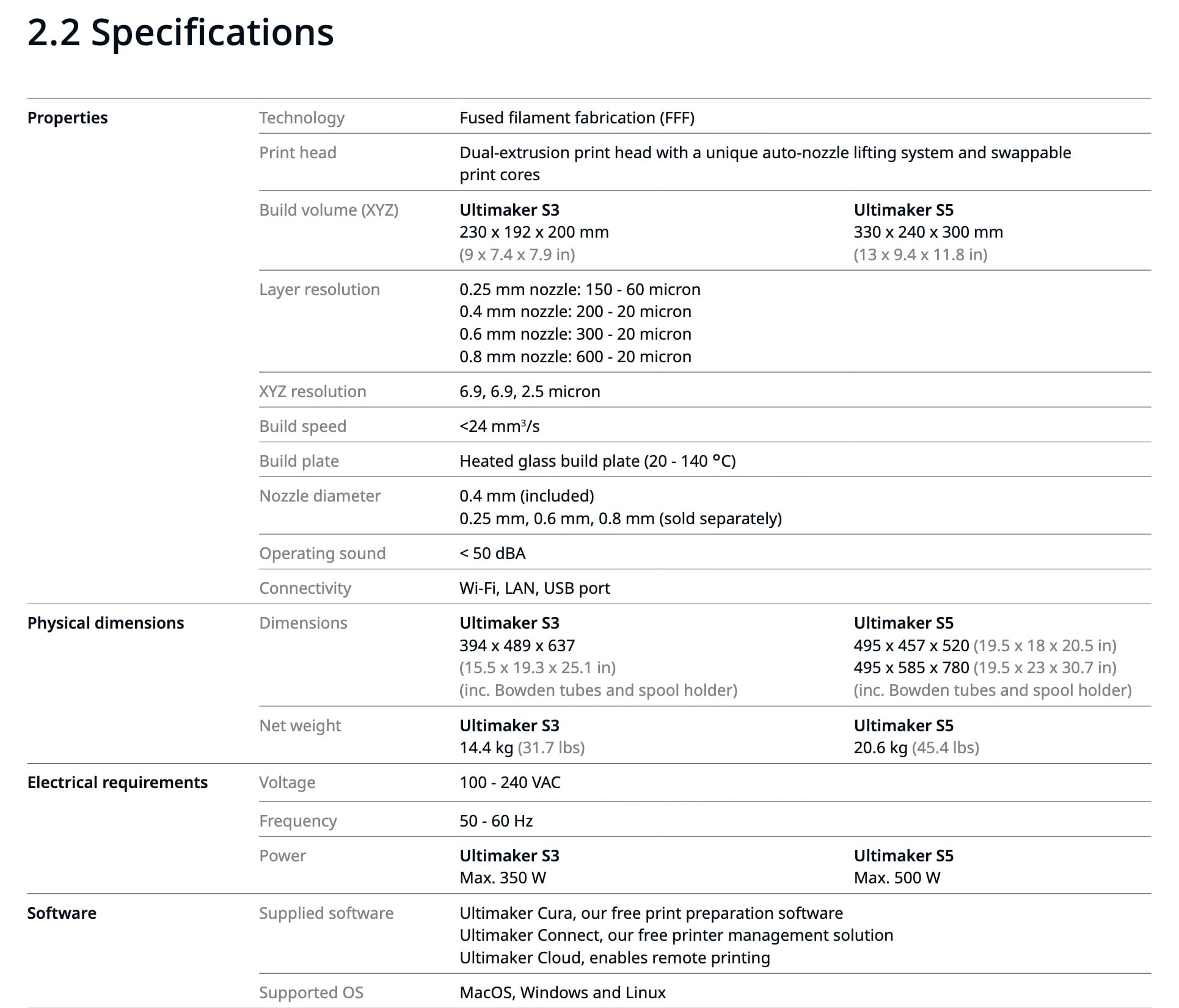
RC has two Ultimaker S5 FDM printers.
[](https://wiki.ridgewoodcommons.nyc/uploads/images/gallery/2026-08/scaled-1680-/ultimaker-s5-manual-parts-diagram-jpeg.jpeg)
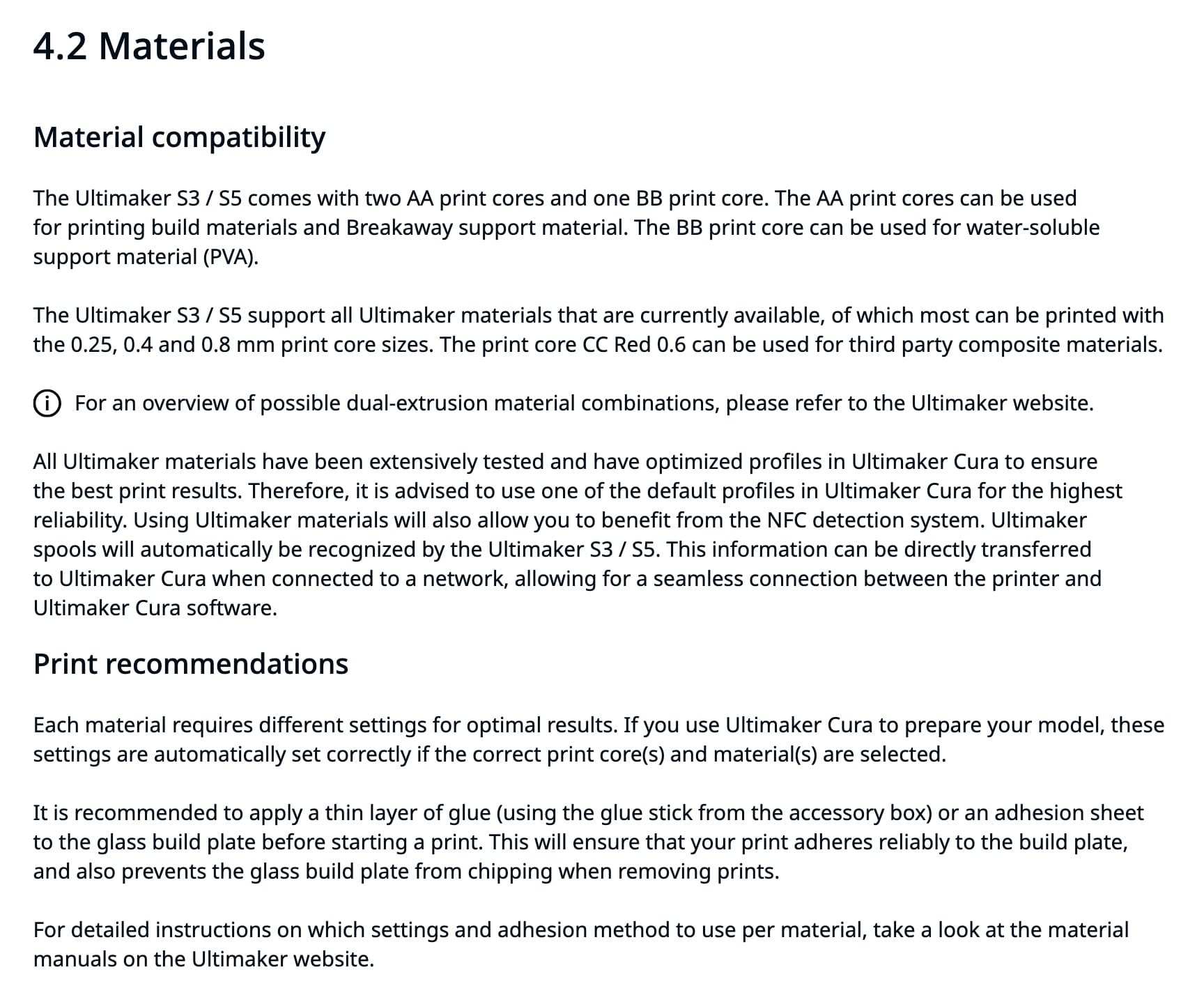
S5s are dual extruder units, with a single print head. Depending on the "cores" (Ultimaker term, generic term: "hotend"), they can print in two colors of the same build material, hold extra build material on a 2nd spool to change supplies if one spool runs out, or print [supports](https://buildit.sdsu.edu/supports/) from alternate materials that separate more easily, or dissolve in water.
[](https://wiki.ridgewoodcommons.nyc/uploads/images/gallery/2026-08/scaled-1680-/ultimaker-s5-manual-meterials-overview-jpeg.jpeg)
[](https://wiki.ridgewoodcommons.nyc/uploads/images/gallery/2026-08/scaled-1680-/ultimaker-s5-manual-touchscreen-overview-jpeg.jpeg)
## More Detail
[](https://wiki.ridgewoodcommons.nyc/uploads/images/gallery/2026-08/scaled-1680-/ultimaker-s5-manual-specs-jpeg.jpeg)
## Manuals
[Link to manual on Ultimaker site](https://support.ultimaker.com/s/article/1667410778241): available in EN - English, FI - Finnish, KR - Korean, RU - Russian, CS - Czech, FR - French, NL - Dutch, SE - Swedish, DA - Danish, HU - Hungarian, NO - Norwegian, TR - Turkish, DE - German, IT - Italian, PL - Polish, ZH-S - Chinese (simplified), ES - Spanish, JA - Japanese, PT - Portuguese, ZH-T - Chinese (traditional).
[English language manual direct link](https://um-support-files.ultimaker.com/manuals/user-manual/S3-%26-S5/Ultimaker%20S3-S5%20-%20User%20manual%20ENv2.4.pdf) (PDF)
## Print Adhesion
After some peeling/warping prints, I tried using a glue stick. It left marks on the print, as matte streaks (vs the glossy finish against clean glass).
From [reddit](https://www.reddit.com/r/3Dprinting/comments/rio4tx/comment/hoyterp/):
PLA on glass shouldn't need adhesion help. It'll turn out to be one of four things:
- your glass isn't actually as clean as you thought
- your bed isn't as level as you thought
- your first layer height is a touch too high
- your temperatures need revisiting
Also, glass does best if allowed to heat soak a bit before you start printing - it's a reasonable insulator, so takes a while for the top surface to get up to temperature when heated from the bottom. Hot PLA on cold glass doesn't stick all that well.
[This person says](https://www.reddit.com/r/3Dprinting/comments/rio4tx/comment/hoyk2dk/) if you can feel the glue, it's too much, and needs to be buffed:
The Ultimaker S5 glass bed can apparently be changed to a more typical steel flex plate: [https://shop3duniverse.com/products/magnetic-flexible-pei-build-plate-for-ultimaker-s5](https://shop3duniverse.com/products/magnetic-flexible-pei-build-plate-for-ultimaker-s5)
# Ultimaker S5 - Zorro
RC has two Ultimaker S5 machines, this page is for Zorro specific info.
# Ultimaker S5 - Luna
Needs flashing that requires partial (potentially dangerous) disassembly, or possibly new parts.
Possible documented fix: [https://gr5.org/unbricking/](https://gr5.org/unbricking/)
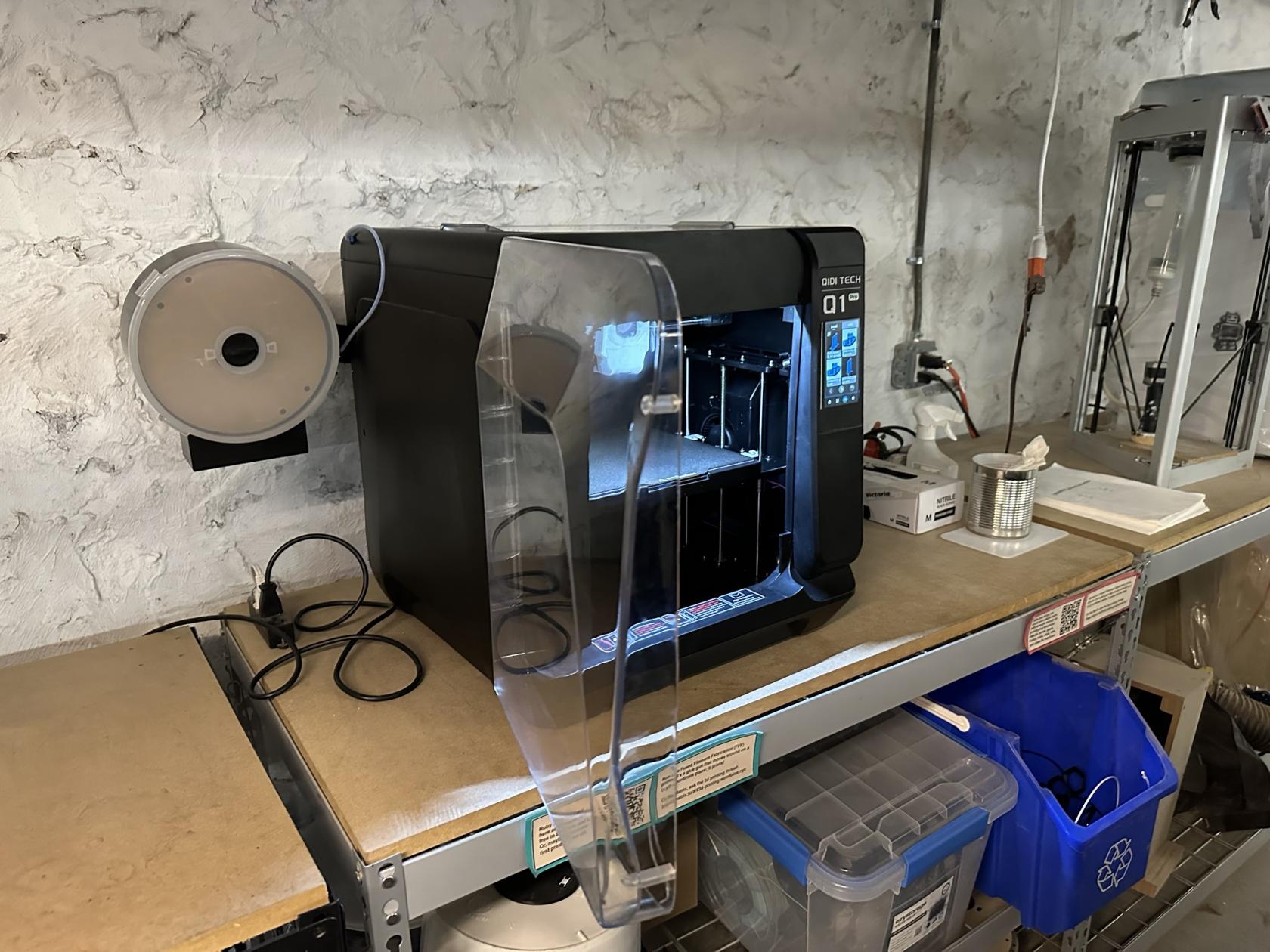
# Qidi - Q1 Pro
## Overview
Use their slicer [https://github.com/QIDITECH/QIDIStudio/releases](https://github.com/QIDITECH/QIDIStudio/releases)
Hostname is `mkspi` so you can access fluidd via [http://mkspi](http://mkspi) , or likely [http://192.168.1.211](http://192.168.1.211)
[](https://wiki.ridgewoodcommons.nyc/uploads/images/gallery/2026-08/scaled-1680-/signal-2026-04-06-142202-jpeg.jpeg)
## Filament Changing