Ooza cnc router, coffee 3d printer, and pen plotter
Ooza is our name for the large CNC rig in the basement. It's capable of basic 2D plotting, as well as soft material extrusion via an attached controllable air pressure regulator. We also have a dewalt router ready to be attached. Reach out to micro or lp for training and usage. (PW ooze)
WIki for RatRig Killerbee (1510?)
3D Model Viewer (wants email for download)
Layout
layout drawing A0 Landscape (electronics left side) work area - 1189x841x95mm.

Tools
Pen holders, sized for sharpies by @LP
Pen Plotting Software
List of pen plotter software
web: ooze
pi: oozaooze
- Ooza plotter toolheads
- Motors
- Biomaterial Recipes for 3D oozing
- OOZA Biomaterials printing log + TO DO
- Ooza gcode controls
Ooza plotter toolheads
Pen holders, sized for sharpies
Motors
LDO-57STH86-3004A
Stealthchop
We set stealthchop motion because its quieter, and we set it from moves as slow as 5mm/s so that we don't get whiplash from switching between stealthchop (voltage-controlled) to maxspread (pwm-controlled) output at high speeds.
Stall Detection
Stall detection gives us virtual endstops on the maximum X and Y, and protection if a toolhead gets stuck on something.
Note! I am not sure if the rated toque should be 3.0A, or 3.0A * 2 because there are two phases in the motor
A rough figure for the minimum speed in full steps per second (M915 H parameter) for which you should be able to get reliable stall detection is given by this formula:
min_full_steps_per_second_for_reliability =
steps_per_full_rotation * rated_current
* (actual_current/(sqrt(2) * pi * rated_torque_nm))
steps = 400
rated = 3
actual = 0.8 Amp
pi = 3.142
sqrt(2) = 1.414
torque = 2.4 N/m (from 24.5Kg-cm)
actual / (sqrt(2) * pi * torque) = 0.075
steps * rated * 0.075 = 90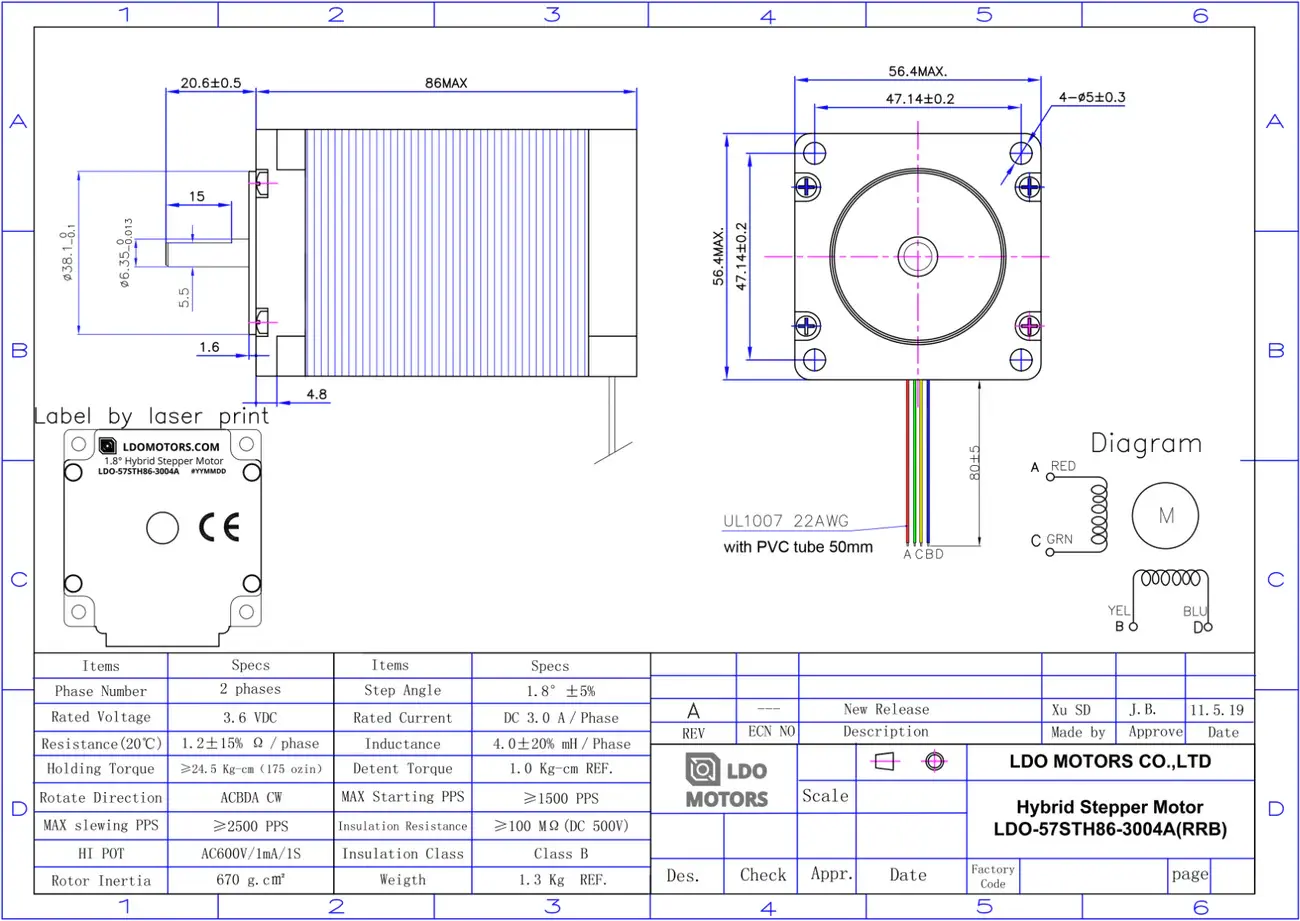
Biomaterial Recipes for 3D oozing
MATERIALS + RECIPES
Fiona Bell / Leah Beuchley Biomaterial Recipes for 3D Printing
Materiom materials reference database
Collection of recipes and experiments from 2022 MICA class
A.LIVE Bioplastic Cook Book - Great examples and descriptions
STARTER MATERIALS:
BIOPOLYMERS: (thickening, durability, texture, strength)
Agar, carrageen, cornstarch, potato starch, alginate
PLASTICIZERS: (flexibility)
glycerine, sorbitol
ADDITIVES: (various qualities- stability against shrinkage if too much water)
vinegar, sunflower oil, soap, baking soda, clay powder, fiber, wax, eggshells, coffee grounds, orange peels
3D PRINTER SLICERS FOR BIOMATERIALS
Hand + Machine various SLICER for 3D printing with Biomaterials
Some recommended tools to get set up for 3D oozing with biomaterials:
Eazao Heater added to print head suggested for uniform printing qualities
Food dehydrator - to prevent uneven shrinkage and cracking
OOZA Biomaterials printing log + TO DO
(heck- 8/29) Gcode scripts needed:
- Some command to pause oozing when ooze in tube is running low, before it runs out. This could be based on time running with a certain pressure, or based on a sensor reading the amount of paste. Ooza should STOP before the paste runs out to enable tube change or adding of material to tube.
- Some command to "go poop in a corner" after reloading of material: The material will extrude a small amount and smear the ooze outside of the print zone (in a far corner of the workspace, to clear the nozzle if paste has dried at the tip of the nozzle.
- Some code to
control buttons for
- open solenoid
- close solenoid
- set pressure to zero
- set pressure to 10%
- set pressure to 90%
Ooza gcode controls
Solenoid
This is something that pinches the air supply completely, like 'pen down' and 'pen up'
Configured with M950 P2 C"out7" Q65535
Open regulator? with M42 P2 S1 turns the green light on
Close regulator? with M42 P2 S0 turns the green light off
Pressure Regulator
This is what controls the output of the compressor
Configured with M950 F0 C"out9" Q500; M106 P0 C"regulator" H-1
No pressure with M106 S0
Half pressure with M106 S0.5