Internet
From August 7th, 2026, we have temporary unplugged Verizon, to smoke test if NYC Mesh is good enough to serve the community. Special attention will be given to coworkers, as a crucial source of income to the space.
Ridgewood Commons provides free wired and wireless internet access, courtesy of NYC Mesh. The network buildout and maintenance has been the result of many contributors over the years. This snapshot of understanding and opinions is an invite for discussion, disagreement, and reflection.
I hope to build our resilience and have fun maintaining our network. Contribute by looking at current tasks.
Why write this?
because micro's memory of conversations is poor
to help RC Tech Admin more safely and swiftly respond to changing community internet needs
to improve the resiliency of the space, and extend that resiliency to our neighbors
How we help each other
Folks with interests and expertise beyond technical can share their values, so we can maintain a network that reflects those values.
Folks with technical interest or expertise can help demystify what the internet is, making it knowable and malleable.
How to get involved
Reach out to RC Tech Admin, directly or indirectly. Introduce yourself when you see someone messing with big loops of wire or electronics with blinking lights. I'm probably gonna do office hours, using a tool a community member made to help find a good time for us to do so.
The network
We operate one semi-public network for use in the space. Access over wifi ssid RidgewoodCommons is the advertised way to connect in the space, complete with silly-hard-to-say-aloud password with qr code. NYC Mesh is the volunteer community maintaining our connection to the rest of the internet. Neighbors sharing wifi with each other, really well documented operations complete with security considerations. Reading some of the writing on that wiki directly motivated me to fill out this page.
RidgewoodCommons (Testing)
We donate $0/month to NYC Mesh, a volunteer-run, community organized internet service provider. I gushed above about what the org does. Currently we are upgrading our connection to the wider mesh, and asking folks to try it out but that it is unstable. If you are interested reach out, we will announce when we are more confident in taking on more testers.
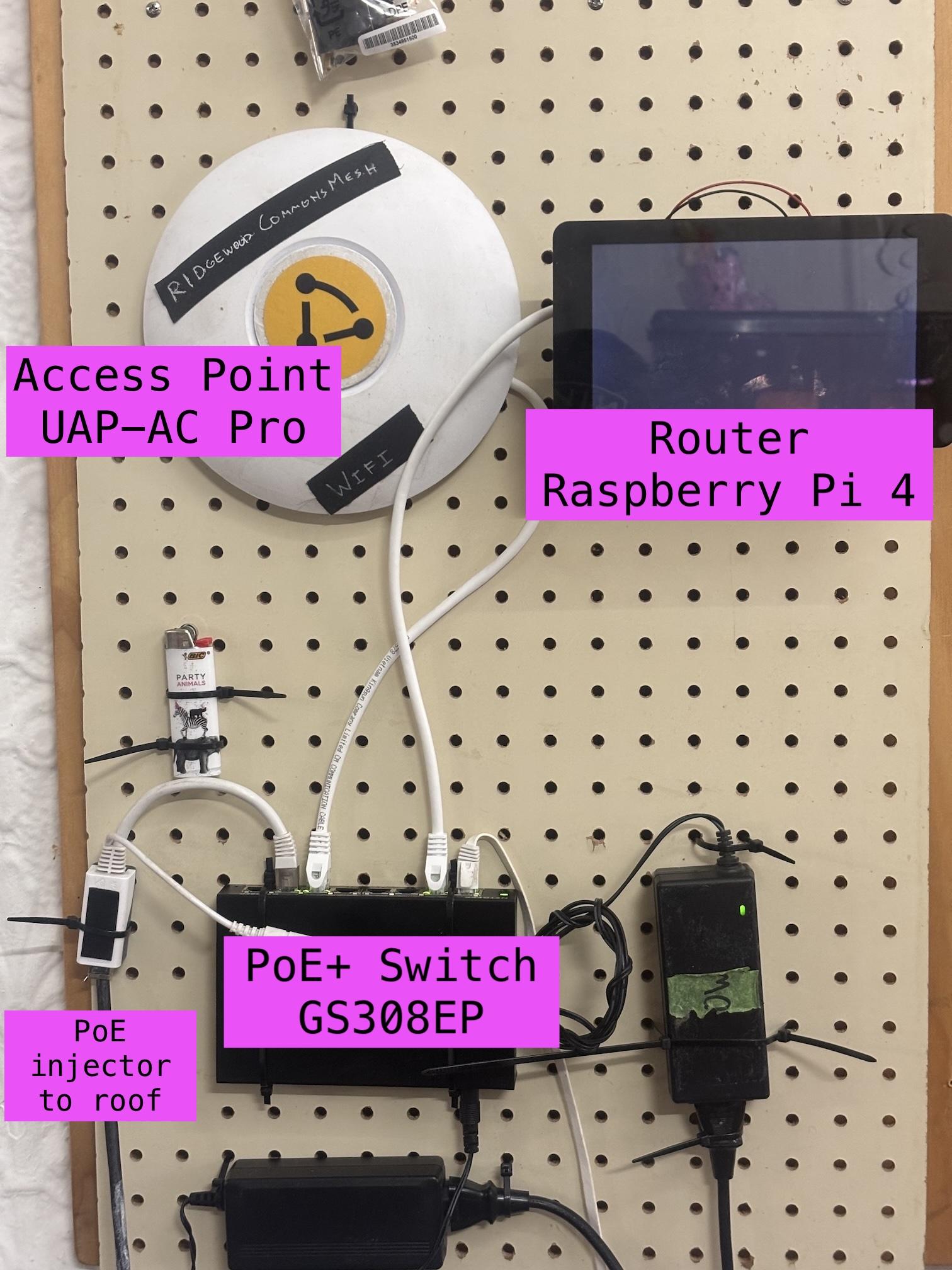
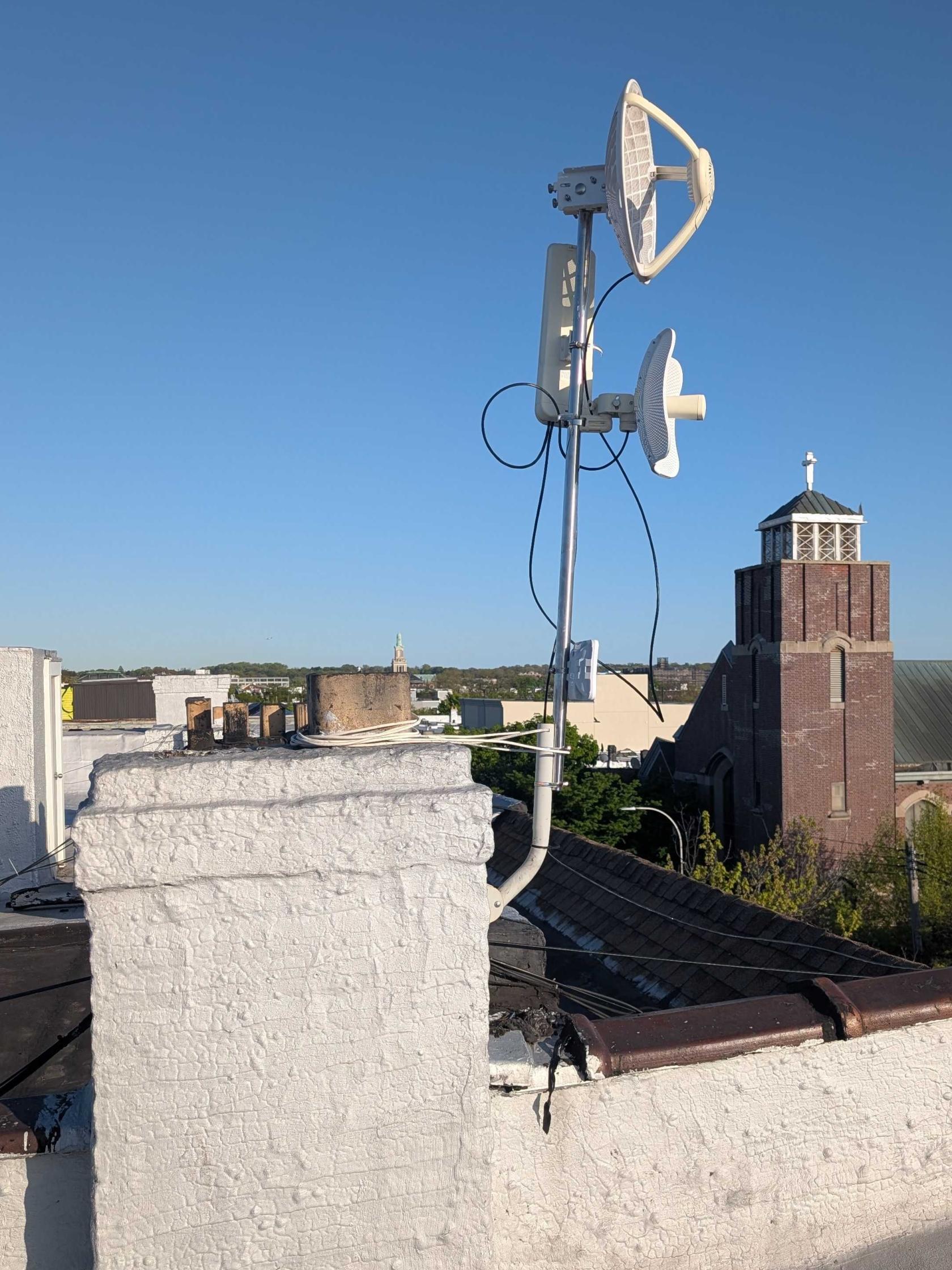
The mess of electronics mounted on the southeast (right) wall under the projector screen is the inside half of our network. The outside half is up on the roof, which connects us to the wider mesh and eventually to the internet.
If you connect to RidgewoodCommons your device will receive a DHCP address by the raspberry pi in 10.70.127.1/24. This pi on the wall network peers with a omnitik on the roof network over a protocol called BGP.
This means the board in the basement is a complete, literal example of how the internet works. If you think this is cool, then you are cool. 😎
location | model | service | notes | power | cost |
wall | Wayru Miner |
access point | OpenWRT nightly (comfast 933 patches) | 18W | 300 |
wall | Netgear GS308EP | 10.70.127.9 VLAN port mapping PoE+ | 60W PoE+ 30W/port max | 6W | 80 |
wall | Raspberry Pi 4 Model B PoE+ Hat | DHCP 10.70.127.1/24 Mesh 10.69.2.154/32 Web Server | Arch Linux Arm linux-rpi kernel ipv4 forwarding | 15W | 145 |
wall | RPi 7" touchscreen | hypno-animation | ~/fb16/build/bin/testLines | 1W | 40 |
roof | Mikrotik Omnitik | Mesh peer 10.69.2.54/32 [future] switch + wds?? | PoE + switch, bird | 18W | 120 |
roof | Ubiquiti Litebeam AC Gen 2 | 5Ghz gateway to vernon | disabled | 7W | 75 |
roof | AF60-LR | 60Ghz gateway to vernon | main uplink | 22W | 270 |
root | sxqsq 5 ac | router offload for omnitik? | 24V PoE | 7W | 50 |
basement | Ubiquiti Unifi UAP-AC Pro |
access point | 6W | 70 |
VLAN
To have our own network, the pi is the dhcp server and router. The pi only has 1 ethernet port, so we use a vlan to create a second virtual cable. Ports 2 and 7 are the special ones.
port | mode | pvid (primary vlan id) | vlan memberships |
1 | trunk | 1 | 1U |
2 | trunk | 1 | 1U, 52T |
3 | trunk | 1 | 1U |
4 | trunk | 1 | 1U |
5 | trunk | 1 | 1U |
6 | trunk | 1 | 1U |
7 | access | 52 | 52U |
8 | trunk | 1 | 1U |
Technical Details
A ton of random things to know
Router Setup
/etc/sysctl.d/10-enable-ipv4-forwarding.confnet.ipv4.forward = 1
Peering with the roof
[root@alarm ~]# birdc show ospf neighborsBIRD 3.2.0 ready.ospf1:Router ID Pri State DTime Interface Router IP10.69.2.54 1 Full/PtP 38.928 end0.52 10.69.2.54