
SOP: Weekly Schedule Generation
Current workflow for weekly schedule graphic generation
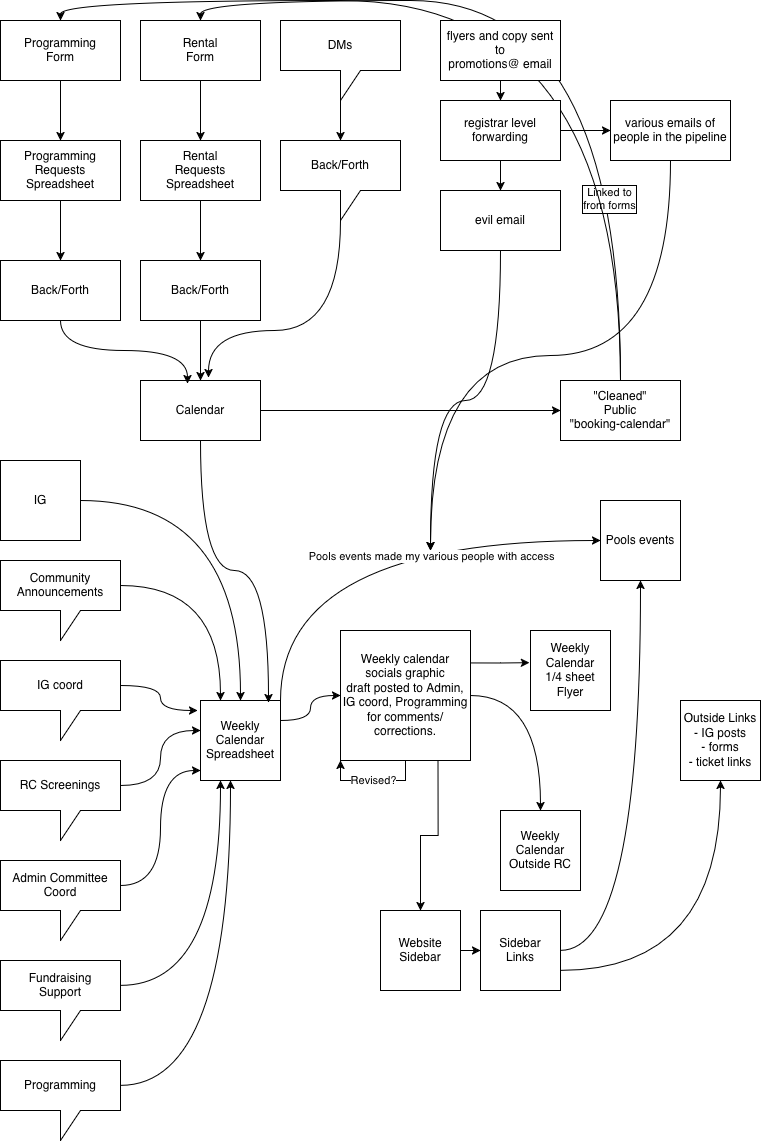
To populate the source spreadsheet:
- Check calendar
- Watch tons of groups
- Clarify events via asking in various groups when needed
- Check evil email or be added to promotions@ forward
Spreadsheet doc is published as CSV data via special URL.
That CSV data feeds the generation tools at https://ridgewoodcommonsnyc.codeberg.page/tools/ & the site sidebar at https://ridgewoodcommons.nyc
Text Explanation
People reach out to programming via the website form for rentals or programming, or via DMs.
After back and forth re: dates/times/needs/costs, events are placed on calendar. May be a "hold" prior to confirmation.
Calendar is sanitized by a (perl? python?) script that runs on our server, outputs to "booking-calendar". Strips event body, leaves only title. May or may not use a set of #tags in title or body to help manage visibility, not sure.
Flyer maker watches discussion in a variety of groups for stuff that doesn't necessarily flow through programming, like movie screenings and some other stuff.
Copy and graphics for promo come through various groups, or via promotions@
A draft schedule is made fri/sat/sun for next week, submitted to a few groups for feedback/corrections.
Revised graphic is shared to IG coord chat, community announcements chat
Graphic is taken from those groups to post on IG, bluesky
Technical Explanation
The source spreadsheet is automatically published as a CSV. This CSV data is run through a one-page javascript app hosted on codeberg pages. The URL of the CSV source data is set in a config variable within the tool.
The tool itself was vibe-coded (for shame), and has some strange internal hacks and questionable methods (e.g. using HTML canvas to create the 4-up version), but the ability to target elements by DOM hierarchy is actually very useful for making adjustments to the page layout as event density changes week to week - tweaks that could be more difficult in a traditional page layout program.
No comments to display
No comments to display