
Mediawiki Test Install Documentation
Doing a local MediaWiki install, to experiment with skins and plugins, to try and make it nice.
Site "profile" AKA ACL setup
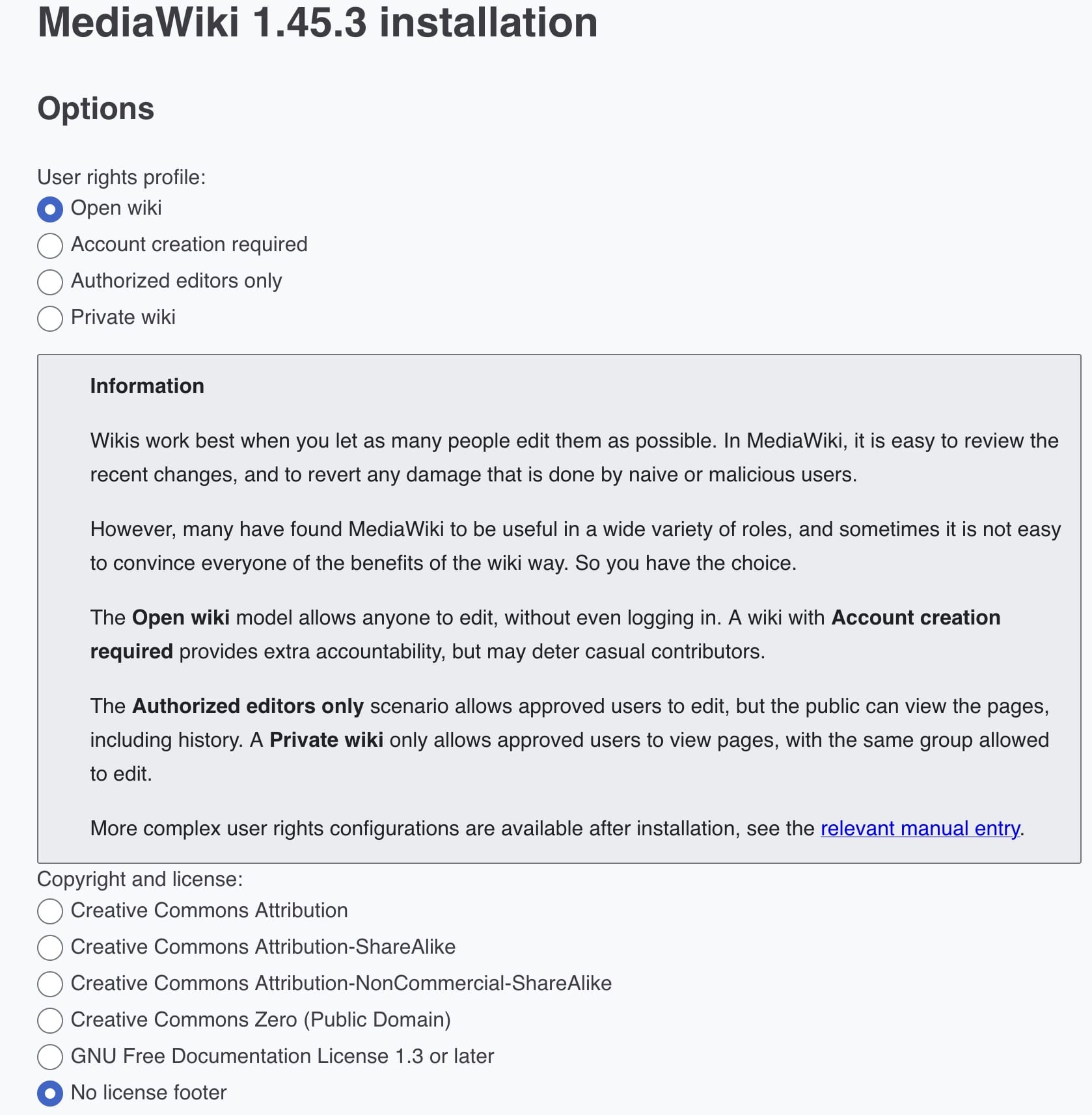
https://www.mediawiki.org/wiki/Manual:User_rights
Default Extensions
Default suggested list:
Special pages
CheckUser is an extension that allows a user (with the checkuser permission) to check which IP addresses are used by a given username and which usernames are used by a given IP, without having to run queries directly against the database by hand. The extension is running live on all Wikimedia wikis.
Replace Text is an extension to MediaWiki that provides a special page, as well as a command-line script, to allow administrators to do a server-side global string find-and-replace on both the text and titles of the wiki's content pages.
The Nuke extension makes it possible for sysops to mass delete pages.
The Linter extension tracks lint errors from an external service. Currently the main use case is to track the errors identified by Parsoid and expose them to editors. Help for users wanting to fix errors is available at Help:Extension:Linter.
The Notifications extension, historically called Echo in code and documentation for sysadmins and developers, provides an in-wiki notification system that provides the user with alerts and notices about activity on the wiki, such as another user mentioning them on a talk page, or an edit of theirs being reverted. Other MediaWiki extensions can make use of Notifications to send their own notifications; Thanks and DiscussionTools are two such extensions.
Editors
The CodeEditor extension extends the WikiEditor advanced editing toolbar with an embedded Ace editor widget, providing some handy features for user/site JavaScript pages, CSS pages, JSON pages, and when extension Scribunto is also installed, for Lua pages, i.e. pages in the Module namespace. The code editor does not show on regular wiki pages, i.e. wiki pages with the "wikitext" content model. (See Extension:CodeMirror for syntax highlighting of wikitext when using the source editor.)
It provides the following features:
- syntax highlighting for JavaScript, CSS and Lua
- auto-indent
- tab key produces tab indents (since 1.22), soft indents before.
- indent/unindent selection with Tab ↹/⇧ Shift+Tab ↹ keys
- syntax validity check for JavaScript
- Pair-matching for parenthesis, braces and square brackets
The WikiEditor extension provides an improved interface (primarily a toolbar) for editing wikitext. It is the wikitext editing interface that Wikipedia started using in 2010 for desktop users, and so it is sometimes called the 2010 wikitext editor.
The VisualEditor extension allows for editing pages as rich content. It is based around a JavaScript library, also called "VisualEditor", that can potentially be used outside of MediaWiki as well. This page covers instructions for installing and configuring the VisualEditor extension. For help on using it, see Help:VisualEditor/User guide. For information on the development of the extension and the library, see VisualEditor.
Parsers
TemplateStyles is a parser extension that allows users to store custom CSS code on wiki pages and to embed these styles into articles via the <templatestyles> tag. The extension allows only a safe subset of CSS syntax stored in embeddable style pages. This is powered by the Css-sanitizer library.
The TemplateData extension introduces a <templatedata> tag and an API which together allow editors to specify how templates and their parameters should be used. This information is available as a nicely-formatted table for end-users, and as a JSON API, which enables other systems (e.g. VisualEditor) to build interfaces for working with templates. See Help:TemplateData for in-depth help.
The SyntaxHighlight extension, formerly known as SyntaxHighlight_GeSHi, provides rich formatting of source code using the <syntaxhighlight> tag. It is powered by the Pygments library and supports hundreds of different programming languages and file formats.
The Scribunto (Latin: "they shall write!") extension provides a framework for the embedding of scripting languages into MediaWiki pages.
Although theoretically any scripting language can be supported, since its release in 2012 Scribunto has only supported one language, Lua.
Scribunto Lua scripts go in a namespace called Module. Modules are run on normal wiki pages using the #invoke parser function and each module has a collection of functions, which can be called using wikitext syntax such as:
The Poem extension allows easy formatting of poems and similar material within Wikitext. Once the extension is enabled, you can put any block of text within <poem></poem> tags, which has the following effects:
- All newlines are preserved by converting them into
<br />tags - The block of text is enclosed in
<p>...</p>tags (as well as a div of class "poem") - Colons at the beginning of a line are converted into 1 em indentation
- Spaces at the beginning of a line are preserved and no longer invoke the
<pre>tag
The extension preserves wikilinks, bolding, etc. if they are present in the poem.
The ParserFunctions extension enhances the wikitext parser with helpful functions, mostly related to logic and string handling. Since MediaWiki 1.15, ParserFunctions has incorporated most (but not all) functions from the former StringFunctions extension, which may be enabled or disabled.
For instructions on how to use this extension, see the help pages.
The Math extension provides support for rendering mathematical formulae.
More information about installing and configuring this extension, including for older versions, can be found at Extension:Math/advancedSettings.
See an overview of what can currently be done with this extension at Extension:Math/Syntax.
The InputBox extension adds already created HTML forms to wiki pages. Users can "complete" a form (entering text, selecting menu items, etc.) by entering text into the box.
InputBox was originally created by Erik Möller for the purpose of adding a Create an article box to Wikinews.
The ImageMap extension allows clickable image maps. An image map is a list of coordinates in a specific image, which hyperlinks areas of the image to multiple destinations (in contrast to a normal image link, in which the entire area of the image links to a single destination). For example, a map of the world may have each country hyperlinked to further information about that country. The intention of an image map is to provide an easy way of linking various parts of an image without dividing the image into separate image files.
The Cite extension allows a user to create references as footnotes on a page. It adds two parser hooks to MediaWiki, <ref> and <references>; these operate together to add citations to pages.
The CategoryTree extension provides a dynamic view of the wiki's category structure as a tree. It uses AJAX to load parts of the tree on demand. CategoryTree was originally written by Daniel Kinzler as an external tool, but was later integrated into the MediaWiki software with the help of Tim Starling.
Media handlers
The PdfHandler extension shows uploaded PDF files in a multipage preview layout.[1]
Together with the Proofread Page extension, PDF files can be displayed side-by-side with text. This allows users to transcribe books and other documents.[2]
Spam prevention
The TitleBlacklist extension allows wiki administrators to block the creation, movement and upload of pages, the title of which matches one or more regular expressions, as well as blocking creation of accounts with matching usernames.
The SpamBlacklist extension prevents edits that contain URLs that match regular expression patterns defined in specified files or wiki pages and registration by users using specified email addresses.
When someone tries to save a page, this extension checks the text against a (potentially very large) list of illegal host names. If there is a match, the extension displays an error message to the user and refuses to save the page.
The ConfirmEdit extension lets you use various CAPTCHA techniques to try to prevent spambots and other automated tools from editing your wiki, as well as to foil automated login attempts that try to guess passwords.
ConfirmEdit ships with several techniques/modules to generate a captcha.
The AbuseFilter extension allows privileged users to set specific actions to be taken when actions by users, such as edits, match certain criteria.
For example, a filter could be created to prevent unregistered users from adding external links, or to disallow edits that remove more than 2000 characters.
API
The PageImages extension collects information about images used on a page.
It aims to return the single most appropriate thumbnail associated with an article.
PageImages also provides OpenGraph protocol metadata for articles on the wiki for 3rd parties like Facebook to extract.
Other
The Thanks extension adds a quick way to give positive feedback for productive contributions to MediaWiki sites. It allows users to send public 'thank you' notifications (via Echo) to other users for their edits and some logged actions.
A 'thank' link is added in the following places:
- next to the 'undo' link in history and diff views;
- on some log entries on Special:Log (see #Configuration, below); and
- if the StructuredDiscussions extension is installed, to Flow board comments.
It also provides an API for sending thanks.
Note that if you do not want to be thanked, you can easily disable this notification in your preferences, as described below.
The TextExtracts extension provides an API which allows retrieval of plain-text or limited HTML (HTML with content for some CSS classes removed) extracts of page content.
The SecureLinkFixer extension automatically rewrites URLs to HTTPS if the domain always requires HTTPS. It uses the Mozilla HSTS preload list for the list of domains.
The rewrite is done on-the-fly as pages are parsed. No edits to the wiki are made, and the page source retains the original URL.
The OATHAuth extension provides two-factor authentication (2FA) support. It enables MediaWiki users to log in more securely, using authentication codes, security keys, or passkeys, along with their regular password. It uses the OATH (Initiative for Open Authentication) and WebAuthn standards.
OATHAuth supports the following methods of two-factor authentication:
- Password managers and authenticator apps
- Passkeys
- Security keys
- Recovery codes
OATHAuth also includes experimental support for passwordless login, and provides a 2FA framework that other extensions can plug into.
The MultimediaViewer extension gives wiki users a different interface for viewing full-size or nearly full-size images in their browser without extraneous page loads or confusing interstitial pages.
The LoginNotify extension notifies you when someone logs into your account. It can be configured to give warnings after a certain number of failed login attempts (The number is configurable, and can be different between unknown IPs/devices and known IPs/devices). It can also give Echo notices (which can also be emailed) for successful logins from IPs you don't normally use. It can optionally integrate into the CheckUser extension in order to determine if the login is from an IP address you don't normally use. It can also set a cookie to try and determine if the login is from a device you normally use.
The Gadgets extension allows users to select JavaScript or CSS-based "gadgets" provided by other wiki users.
Gadgets are made up of JavaScript and/or CSS Snippets located on pages in the MediaWiki namespace. Each gadget is defined by a line in MediaWiki:Gadgets-definition, providing a name and description for the gadget, and a list of the JS and CSS snippets that it uses (see #Usage section below).
Since Gadgets reside in the MediaWiki namespace (the list defining the gadgets as well as the actual code snippets), only sysops (interface admins from 1.32) can edit the code. This is as it should be: only users especially trusted by the wiki community should be able to edit JavaScript code used by other users since JavaScript can easily be used to hijack accounts or spy on people.
The DiscussionTools extension is a set of tools to enhance discussion pages. As of 2024, it is being built by the Editing team as part of the talk pages project.
User documentation is at Help:DiscussionTools.
Some features can be disabled on individual pages and sections as described at Help:DiscussionTools/Magic words and markup.
Search Extensions
Some extensions to consider to tweak search experience:
https://www.mediawiki.org/wiki/Extension:AdvancedSearch
Heavy UI, maybe nice to have available, but trades power/complexity pretty evenly.
https://www.mediawiki.org/wiki/Extension:CirrusSearch
To integrate with elastic search. Might also need https://www.mediawiki.org/wiki/Extension:CirrusSearch
https://www.mediawiki.org/wiki/Extension:LinkSuggest
Not exactly a search, but autocompletes suggested links
https://www.mediawiki.org/wiki/Extension:MediaSearch
Provides gallery results for media searches vs media page title/link
https://www.mediawiki.org/wiki/Extension:SearchParserFunction
Kinda cool extension to make "embedded searches" - renders searches that are encoded into wiki markup in content
https://www.mediawiki.org/wiki/Extension:SearchThumbs
Search results are delivered as page thumbnails. Depending on size of thumbnail and content on wiki perhaps not so useful
This list leaves out some large/powerful/complex directions like WikiBase and SemanticMediaWiki
Faceted Search (helping users find content)
In an organization like RC, the amount of minutes pages will grow faster than documentation and help pages.
The ability to facet searches would be helpful in this context, so that a search for "compost" returns practical information vs all compost discussion over the past years.
Mediawiki options:
- Categorization
- Namespaces
- More complex search integrations
Categorization
Categories are familiar (if people have ever used Wikipedia), but have usage restrictions. It's easy to click a category and get a listing of pages, but not easy to search within a category. Categories can be used in certain types of embedded searches such that a section can be made that's dynamically populated by category contents, but still with no search function.
Categories aren't used at all in the built-in search tooling.
Namespaces
Namespaces can be used as search facets, but MediaWiki generates a number of built in namespaces, some of which are confusing, like Template, Module, Mediawiki...
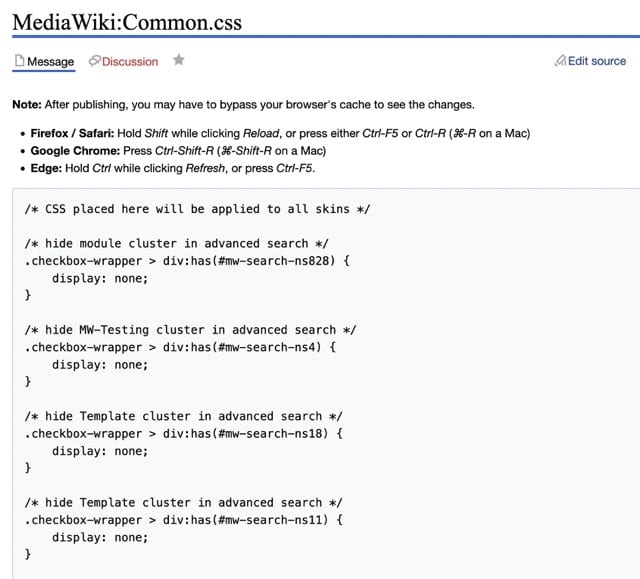
Extra namespaces can be made very easily in LocalSettings.php. Existing namespaces can be hidden with CSS.
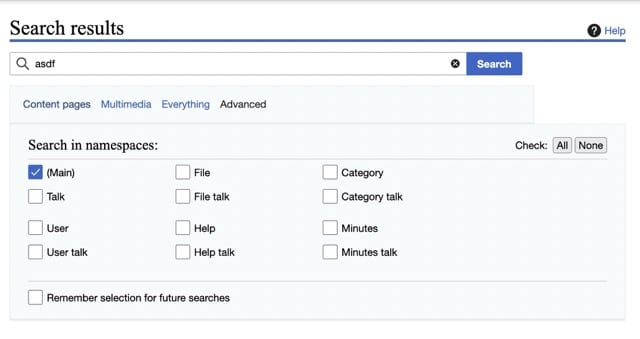
But the CSS hiding namespaces from the advanced search are brittle, as namespaces CSS identifiers appear to be somewhat dynamic.
Excerpt of example rules:
More complex search integrations
Hiding by category isn't something the default MediaWiki search engine can do at all, regardless of CSS or config, it's a structural limitation. Categories are stored in a separate database table (categorylinks) from the search index (searchindex), and the stock SQL-based search engine only ever queries the search index. It has no concept of category membership at query time.
The standard fix is CirrusSearch, the Elasticsearch-backed search extension that most production wikis (including Wikipedia) run instead of core search. Once installed, it supports incategory: directly in the query syntax, including negation. But this requires a negative boolean in the search text rather than an exposed toggle, checklist, etc.
You can also bake this into a default search if you want it applied automatically rather than typed each time — usually via a custom search form or a MediaWiki:Searchform override that appends the filter.
Integration with Elastic Search means running more services, more version compatibility and dependency management, etc.
Minutes as a Service
It might be clumsy-elegant to just have a wiki for minutes, and a wiki for documentation.
Also might be possible to modify an etherpad or cryptpad instance such that when creating a pad, you select the working group from a list or free-enter text, select date, and it appropriately titles minutes.
An index of pads is then somehow generated.
Alternate approach - dual install
Another approach would be a dual install, of whatever software: MediaWiki, Outline, Bookstack...
So there would be notes.domain.tld and wiki.domain.tld - they would be titled and themed differently, could have different ACL setups. e.g. in bookstack there could be distinct shelves for upcoming and past meetings - and ACLs could be set such that upcoming agendas are world-visible-editable, and post-meeting they're moved to the other shelf and become hidden from non-logged users.
Could be two installs of the same software (mediawiki likes to do transclusion and interwiki linking), or distinct software to suit each use.
File uploads
One of the classic annoyances of a "classical wiki" is the need to upload files, and then link those files in content.
There are a few different extensions that aim to ease this:
https://www.mediawiki.org/wiki/Extension:MsUpload
https://www.mediawiki.org/wiki/Extension:SimpleBatchUpload
"Templates"
Wikis use the concept of template in a very specific/structured way.
This allows for a more basic implementation of the idea of a template: https://www.mediawiki.org/wiki/Extension:MultiBoilerplate
No comments to display
No comments to display